Multithreading in Java
What is a thread?
A thread is a lightweight subprocess. It is a separate path of execution because each thread runs in a different stack frame. A process may contain multiple threads. Threads share the process resources, but still, they execute independently.
How to implement threads?
- Implementing the Runnable interface
- Extending the Thread class
When to Use Which?
- Use extends Thread: if your class does not extend any other class.
- Use implements Runnable: if your class already extends another class (preferred because Java doesn’t support multiple inheritance).
Advantages of Multithreading
- Improved Performance: Multiple tasks can run simultaneously, reducing execution time.
- Efficient CPU Utilization: Threads keep the CPU busy by running tasks in parallel.
- Responsiveness: Applications (like GUIs) remain responsive while performing background tasks.
- Resource Sharing: Threads within the same process share memory and resources, avoiding duplication.
- Better User Experience: Smooth execution of tasks like file downloads, animations, and real-time updates.
Implementing the Runnable Interface
- Implement the
run()method - Instantiate the
Threadobject - Call thread by using
start()method
class Demo implements Runnable {
	@Override
	public void run() {
		System.out.println("Thread: " + Thread.currentThread().getName());
	}
}

public class TestThread {
   public static void main(String args[]) {
      Demo r = new Demo();
      r.start();
   }
}
Extending the Thread class
- Overring the
run()method - Call thread by using
start()method
class Demo extends Thread {
	@Override public void run() {
		System.out.println("Thread: " + thread.getName());
	}
}

public class TestThread {
   public static void main(String args[]) {
      Demo t = new Demo();
      t.start();
   }
}
Lifecycle of thread
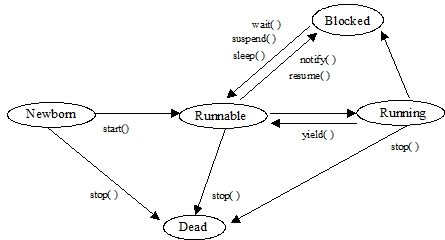
- Newborn : When a thread is created (by new statement) but not yet to run, it is called in Newborn state. In this state, the local data members are allocated and initialized.
- Runnable : The Runnable state means that a thread is ready to run and is awaiting for the control of the processor, or in other words, threads are in this state in a queue and wait their turns to be executed.
- Running : Running means that the thread has control of the processor, its code is currently being executed and thread will continue in this state until it get preempted by a higher priority thread, or until it relinquishes control.
- Blocked : A thread is Blocked means that it is being prevented from the Runnable (or Running) state and is waiting for some event in order for it to reenter the scheduling queue.
- Dead : A thread is Dead when it finishes its execution or is stopped (killed) by another thread.
Threads move from one state to another via a variety of means :
start(): A newborn thread with this method enters into Runnable state and Java run time create a system thread context and starts running it. This method for a thread object can be called only once.stop(): This method causes a thread to stop immediately. This is often an abrupt way to end a thread.suspend(): This method is different fromstop()method. It takes the thread and causes it to stop running and later on can be restored by calling it again.resume(): This method is used to revive a suspended thread. There is no guarantee that the thread will start running right way, since there might be a higher priority thread running already, but,resume()causes the thread to become eligible for running.sleep(int n): This method causes the run time to put the current thread to sleep fornmilliseconds. Afternmilliseconds have expired, this thread will become eligible to run again.yield(): This method causes the run time to switch the context from the current thread to the next available runnable thread. This is one way to ensure that the threads at lower priority do not get started.
Methos to get information about a Thread
currentThread(), setName(String s), getName(), setPriority(int p), getPriority(), isAlive(), isDaemon(), setDaemon()
Synchronization and Inter-Thread Communication
Threads in Java run in the same memory space. This makes it easy for threads to talk to each other. It is also possible for two threads to access same variables or methods in an object. This may cause problems which can be solved by synchronization.
The key word synchronized is used by which method (s) or block of statements can be made protected from the simultaneous access. When a class with synchronized method is instantiated, the new object is given its own implicit monitor. The entire time that a thread is inside of a synchronized method, all other threads that try to call any other synchronized method on the same instance have to wait. In order to exit the monitor and relinquish control of the object to the next waiting thread the monitor owner simply needs to return from the method.
💡
A monitor is an object which is used as a mutually exclusive lock (called mutex). Only one thread may own a monitor at a given time. When a thread acquires a lock it is said to have entered the monitor. All other threads attempting to enter the locked monitor will be suspended until the owner thread exits the monitor. But in Java, there is no such monitor. In fact, all Java object have their own implicit monitor associated with them.
Synchronized method
synchronized void deposit(int amount){
			balance = balance + amount;
			System.out.println( amount + " is deposited");
			displayBalance();
}
For calling non synchronized methods use: synchronized (Object ) { block of statement(s) }
 public void run() {
	   synchronized (account) {
				 account.deposit(amount);
		}
	}
The above were examples of block synchronization.
If a thread is in the static synchronized region, all other threads trying to access this region will be blocked. Since static methods belong to the class therefore, static synchronization applies class level lock. This can be implemented using:
static synchronized returnType nameOfMethod(Type parameters) { //code }
There are three ways for threads to communicate with each other:
- Through commonly shared data. All the threads in the same program share the same memory space. If an object is accessible to various threads then these threads share access to that object’s data member and thus communicate each other.
- The second way for threads to communicate is by using thread control methods.
suspend(): A thread can suspend itself and wait till other thread resumes it.resume(): A thread can wake up other waiting thread (which is waiting usingsuspend()) through itsresume()method and then can run concurrently.join(): This method can be used for the caller thread to wait for the completion of called thread.
- The third way for threads to communicate is the use of three methods below. These are defined in class
Objectof packagejava.lang.These methods provide mechanisms to take care the deadlock situation in Java.wait(): Causes the current thread to wait until another thread invokes thenotify().notify(): Wakes up the first thread that calledwait()on this object.notifyAll(): Wakes up all the threads that calledwait()on the same object.Example code
- A shared buffer (Queue) holds produced items and ensures both threads coordinate access.
- The producer adds items to the buffer and waits if the buffer is full, notifying consumers after producing.
- The consumer removes items from the buffer and waits if the buffer is empty, notifying producers after consuming.
- wait() and notifyAll() manage synchronization, preventing race conditions and ensuring proper inter-thread communication.
import java.util.LinkedList;
import java.util.Queue;

class Buffer {
    Queue<Integer> queue = new LinkedList<>();
    int capacity = 5;

    synchronized void produce(int value) throws InterruptedException {
        while(queue.size() == capacity) wait();
        queue.add(value);
        System.out.println("Produced: " + value);
        notifyAll();
    }

    synchronized int consume() throws InterruptedException {
        while(queue.isEmpty()) wait();
        int val = queue.poll();
        System.out.println("Consumed: " + val);
        notifyAll();
        return val;
    }
}

public class ProducerConsumer {
    public static void main(String[] args) {
        Buffer buffer = new Buffer();

        Thread producer = new Thread(() -> {
            try { for(int i=1;i<=5;i++) buffer.produce(i); }
            catch(InterruptedException e) {}
        });

        Thread consumer = new Thread(() -> {
            try { for(int i=1;i<=5;i++) buffer.consume(); }
            catch(InterruptedException e) {}
        });

        producer.start();
        consumer.start();
    }
}
Daemon Thread
A Daemon thread is created to support the user threads. It works in background and terminated once all the other threads are closed. Garbage collector is one of the example of Daemon thread.
- It is a low priority thread.
- It is a service provider thread and should not be used as user thread.
- JVM automatically closes the daemon thread(s) if no active thread is present and revives it if user threads are active again.
- A daemon thread cannot prevent JVM to exit if all user threads are done.
- Thread scheduler schedules these threads only when CPU is idle.
- Priority of daemon threads is always 1 (i.e. MIN_PRIORITY).
ThreadGroup
The Java ThreadGroup class represents a set of threads. It can also include other thread groups. The thread groups form a tree in which every thread group except the initial thread group has a parent.
ThreadGroup pGroup = new ThreadGroup("Parent ThreadGroup");
ThreadGroup cGroup = new ThreadGroup(pGroup, "Child ThreadGroup");

Thread t1 = new Thread(pGroup, this);
System.out.println("Starting " + t1.getName() + "...");
t1.start();

Thread t2 = new Thread(cGroup, this);
System.out.println("Starting " + t2.getName() + "...");
t2.start();
Volatile Keyword
It tells the compiler that the value of a variable must never be cached as its value may change.
Detailed explanation
Before we move on let’s take a look at two important features of locks and synchronization.
- Mutual Exclusion: It means that only one thread or process can execute a block of code (critical section) at a time.
- Visibility: It means that changes made by one thread to shared data are visible to other threads.
The synchronized keyword guarantees both mutual exclusion and visibility. If we make the blocks of threads that modify the value of the shared variable synchronized only one thread can enter the block and changes made by it will be reflected in the main memory. All other threads trying to enter the block at the same time will be blocked and put to sleep.
In some cases, we may only desire visibility and not atomicity. The use of synchronized in such a situation is overkill and may cause scalability problems. Volatile variables have the visibility features of synchronized but not the atomicity features. The values of the volatile variable will never be cached and all writes and reads will be done to and from the main memory.
For performance reasons, each CPU core has its own local cache (L1, L2, etc.). When a thread is running on a core, it often copies variables from the Main RAM into its local cache to work on them faster.
If Thread A changes a variable in its local cache, Thread B (running on a different core) won’t see that change because it is still looking at its own local cache or the old value in Main RAM. This is called a Visibility Problem.
Rule of Thumb: Use volatile if you are only reading and writing a single value (like a boolean flag). Use synchronized if you are updating a value based on its previous state.
public class Worker extends Thread {
    // Volatile ensures the change is visible across threads immediately
    private volatile boolean running = true;

    public void run() {
        while (running) {
            // keep doing work
        }
    }

    public void stopWorker() {
        running = false;
    }
}
Executor Framework
The Executor framework helps run tasks in a managed thread pool without manually creating threads. Two common ways to run tasks are execute() and submit(), which differ in result handling and exception management.
execute(): Runs a task without returning any result; exceptions may be lost.submit(): Runs a task and returns a Future, letting you get the result or handle exceptions.
ExecutorService es = Executors.newFixedThreadPool(2);

// execute() - fire-and-forget
es.execute(() -> System.out.println("Called by execute"));

// submit() - get result or exception
Future<Integer> f = es.submit(() -> { System.out.println("Called by submit"); });
try {
	f.get();
} catch (ExecutionException e) {
	System.out.println("Caught: " + e.getCause());
}

es.shutdown();
Shutdown methods:
shutdown(): Stops accepting new tasks but allows existing submitted tasks to complete.shutdownNow(): Tries to stop all running tasks immediately and returns tasks that were waiting to execute.
Callable interface
The Callable interface is a part of the java.util.concurrent package. It represents a task that can be executed by multiple threads and return a result. Unlike the Runnable interface, Callable can return a value and throw checked exceptions.
- Used with
ExecutorServicefor asynchronous or concurrent execution. - The result of a
Callableis obtained using aFutureobject. - It’s a functional interface, so you can use lambda expressions.
ExecutorService executor = Executors.newSingleThreadExecutor();

Callable<Integer> task = () ->{
    System.out.println("Calculating...");
    Thread.sleep(1000);
    return 10 * 2;
};
Future<Integer> future = executor.submit(task);
System.out.println("Result: " + future.get());

executor.shutdown();
Runnable vs Callable
| Feature | Runnable | Callable |
|---|---|---|
| Return Type | Does not return any value (void run()) | Returns a value (V call()) |
| Exception Handling | Cannot throw checked exceptions | Can throw checked exceptions |
| Method Used | void run() | V call() |
| Execution Method | Executed using Thread or Executor.execute() | Submitted using ExecutorService.submit() which returns a Future |
| Use Case | Used for tasks that just need to run | Used for tasks that need to return a result |
The Future interface is a part of java.util.concurrent package and represents the result of an asynchronous computation, a value that will be available in the future after the task completes.
Methods of Future Interface
cancel(boolean mayInterruptIfRunning): Cancels the execution of the task if possible.isCancelled(): Returns true if the task was cancelled before completion.isDone(): Returns true if the task is completed or cancelled.V get(): Waits (if needed) and returns the computed result.V get(long timeout, TimeUnit unit): Waits up to the given time and returns the result if available.
CompletableFuture is a Java class (from java.util.concurrent) that represents a future result of an asynchronous computation. You can start tasks in the background, chain multiple tasks together, and handle exceptions without blocking the main thread.
CompletableFuture.supplyAsync(() -> 5)
            .thenApply(x -> x * 2)
            .thenApply(x -> x + 3)
            .thenAccept(result -> System.out.println("Final Result: " + result));

// with exception handling
CompletableFuture<Integer> future = CompletableFuture.supplyAsync(() -> {
    if (true) throw new RuntimeException("Error!");
    return 10;
}).exceptionally(ex -> 0);

System.out.println(future.join()); // Output: 0
It allows you to run multiple asynchronous tasks. Sometimes you need to wait for all tasks to finish or proceed as soon as any task completes. Java provides allOf() and anyOf() methods for this purpose.
CompletableFuture<String> f1 = CompletableFuture.supplyAsync(() -> "Task 1");
CompletableFuture<String> f2 = CompletableFuture.supplyAsync(() -> "Task 2");
CompletableFuture<String> f3 = CompletableFuture.supplyAsync(() -> "Task 3");

// wait for any to complete
CompletableFuture<Object> any = CompletableFuture.anyOf(f1, f2);
System.out.println("First completed: " + any.join());

// wait for all to complete
CompletableFuture<Void> all = CompletableFuture.allOf(f1, f2, f3);
all.join(); // blocks until all tasks complete
System.out.println(f1.join() + ", " + f2.join() + ", " + f3.join());| Feature | Future (Java 5) | CompletableFuture (Java 8+) |
|---|---|---|
| Action on Completion | None. You must poll or block. | Supports callbacks (thenApply, thenAccept). |
| Chaining Tasks | Impossible. | Supports chaining (thenCompose, thenCombine). |
| Exception Handling | Basic (checked exceptions in get). | Rich (exceptionally, handle). |
| Manual Completion | Impossible. | Possible via complete(value). |
| Combining Multiple | No built-in way. | allOf(), anyOf() to join multiple futures. |
ReentrantLock
Reentrant Lock is part of the java.util.concurrent.locks package and provides a more flexible mechanism for thread synchronization compared to the synchronized keyword. It allows threads to enter a lock multiple times (reentrant behavior) without causing deadlock on itself. It offers features like:
- Reentrancy: The same thread can acquire the lock multiple times. Each lock acquisition must be paired with a corresponding unlock.
- Explicit Locking: Unlike synchronized, Reentrant Lock requires manual locking and unlocking using lock() and unlock().
- Interruptible: Threads waiting for a lock can be interrupted.
- TryLock() Support: Threads can attempt to acquire a lock without waiting indefinitely.
- Fairness Policy: Locks can be configured to grant access in first-come-first-serve order.
public class SharedResource {
    private final ReentrantLock lock = new ReentrantLock();

    public void performTask() {
        lock.lock();
        try {
            System.out.println(Thread.currentThread().getName() + " is performing task");
        } finally {
            lock.unlock();
        }
    }
}
Questions
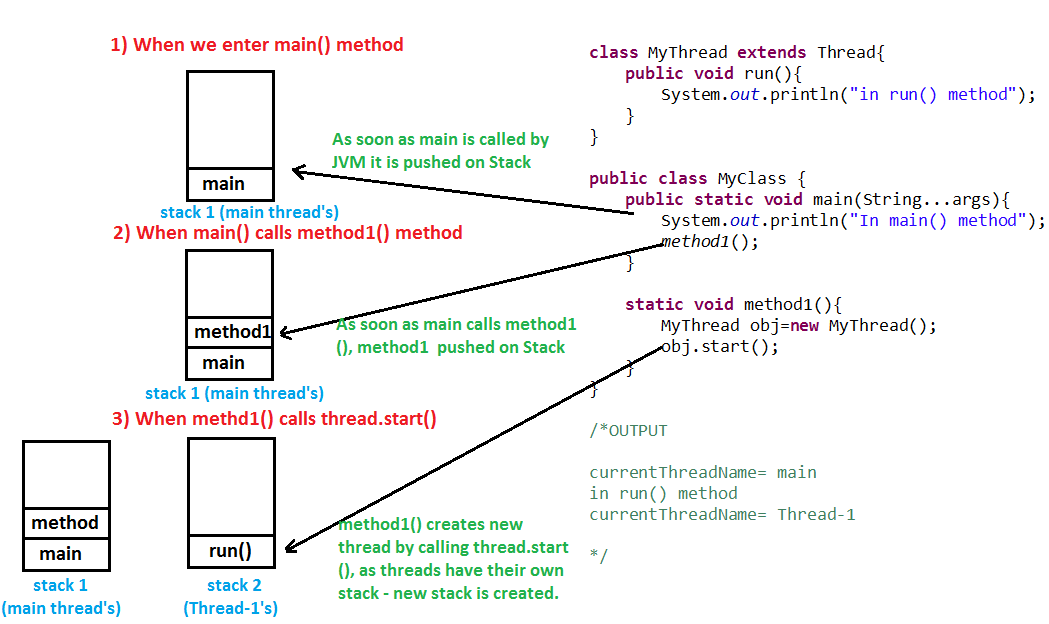
Q: Does a Thread implement their own Stack, if yes how?
A: Yes, Threads have their own stack.
Q: What is difference between starting thread with run() and start() method?
A: When you call start() method, main thread internally calls run() method to start newly created Thread, so run() method is ultimately called by newly created thread. When you call run() method directly, it calls run() method by itself and not in another thread.
Q: How to detect a deadlock condition? How can it be avoided?
A: We can detect the deadlock condition by reviewing the Thread Dump. Example:
Found one Java-level deadlock:
=============================
"Thread-1": waiting to lock monitor 0x... (object 0x..., a java.lang.Object), which is held by "Thread-2"
"Thread-2": waiting to lock monitor 0x... (object 0x..., a java.lang.Object), which is held by "Thread-1"
Ways to avoid the deadlock condition:
- Avoid Nested lock: Nested lock is the common reason for deadlock as deadlock occurs when we provide locks to various threads so we should give one lock to only one thread at some particular time.
- Avoid unnecessary locks: we must avoid the locks which are not required.
- Using thread join: Thread join helps to wait for a thread until another thread doesn’t finish its execution.
- Try-Locks (ReentrantLock): Use tryLock() with timeout to avoid waiting forever.
Q: Can a constructor be synchronized?
A: No, constructor cannot be synchronized. Because constructor is used for instantiating object, when we are in constructor object is under creation. So, until object is not instantiated it does not need any synchronization. Enclosing constructor in synchronized block will generate compilation error. Using synchronized in constructor definition will also show compilation error. Although, we can use synchronized block inside constructor.
Q: How would you implement a custom thread-safe singleton in Java?
A: In multithreaded applications, a singleton class must ensure that only one instance is created, even when multiple threads try to access it simultaneously. Improper implementation can lead to multiple instances or race conditions.
class Singleton {
    private static volatile Singleton instance;
    private Singleton() {} // private constructor
    public static Singleton getInstance() {
        if (instance == null) {           // First check (no lock)
            synchronized (Singleton.class) {
             if (instance == null) {   // Second check (with lock)
                    instance = new Singleton();
                }
            }
        }
        return instance;
    }
}
Note: the getInstance() method can also be marked synchronized, but this will make each call slow. So only synchronize the object creation block. This way is also called double checked locking.
Q: Write a Java program which handles Push operation and Pop operation on stack concurrently.
A:
import java.util.*;

public class SimpleConcurrentStack<T> {
    private final List<T> list = new ArrayList<>();

    // synchronized ensures only one thread can push at a time
    public synchronized void push(T value) {
        list.add(value);
    }

    // synchronized ensures only one thread can pop at a time
    public synchronized T pop() {
        if (list.isEmpty()) return null;
        return list.remove(list.size() - 1);
    }

    public synchronized int size() {
        return list.size();
    }
}
Q: Write a Java program which first generates a set of random numbers and then determines negative, positive even, positive odd numbers concurrently.
A: How this works
ExecutorService: This is a high-level API for managing threads. Instead of manually creatingnew Thread().start(), we submit tasks to a pool.- Separation of Concerns: We have three distinct lambda expressions. Because they only read from the
numberslist, we don’t need complex locking for the list itself (read-only access is thread-safe). - Concurrency: All three classification loops run at the same time. On a multi-core processor, the JVM and OS will attempt to execute these on different cores simultaneously.
import java.util.*;
import java.util.concurrent.*;

public class ConcurrentNumberClassifier {

    public static void main(String[] args) {
        List<Integer> numbers = new ArrayList<>();
        Random random = new Random();
        for (int i = 0; i < 20; i++) {
            numbers.add(random.nextInt(101) - 50);
        }

        System.out.println("Generated Numbers: " + numbers);
        System.out.println("-----------------------------------");

        // create a Thread Pool to run tasks concurrently
        ExecutorService executor = Executors.newFixedThreadPool(3);

        // Task 1: Find Negatives
        executor.execute(() -> {
            System.out.print("Negatives: ");
            for (int n : numbers) {
                if (n < 0) System.out.print(n + " ");
            }
            System.out.println();
        });

        // Task 2: Find Positive Even
        executor.execute(() -> {
            System.out.print("Positive Even: ");
            for (int n : numbers) {
                if (n > 0 && n % 2 == 0) System.out.print(n + " ");
            }
            System.out.println();
        });

        // Task 3: Find Positive Odd
        executor.execute(() -> {
            System.out.print("Positive Odd: ");
            for (int n : numbers) {
                if (n > 0 && n % 2 != 0) System.out.print(n + " ");
            }
            System.out.println();
        });

        executor.shutdown();
    }
}
Java 8 one-liner way
numbers.parallelStream()
       .filter(n -> n < 0)
       .forEach(n -> System.out.println("Negative: " + n));